Schema Markup for AI Search
The schema types that genuinely help AI platforms understand your entity: a connected @graph, Article, Speakable, Product, BreadcrumbList, and sameAs linking. JSON-LD examples for each, with sources.
The schema markup that helps AI search is the markup that describes your entity and connects it together. A connected @graph linking Organisation, WebSite, WebPage, and Article by @id gives AI platforms a verifiable picture of who you are and what a page is about. Article schema with a named author, sameAs links to authoritative profiles (LinkedIn, Wikidata), and BreadcrumbList for structure are the dependable building blocks. FAQPage is no longer a useful target: Google deprecated FAQ rich results in 2023 and we do not recommend it.

The vocabulary used throughout this guide is defined by Schema.org, the shared standard maintained by Google, Microsoft, Yahoo, and Yandex. Google recommends implementing structured data in JSON-LD format and documents every supported type in its structured data gallery. Structured data does not guarantee a citation, but it gives AI systems a reliable, machine-readable account of your entity and content that is far less ambiguous than prose alone.
What schema does (and does not) do for AI search
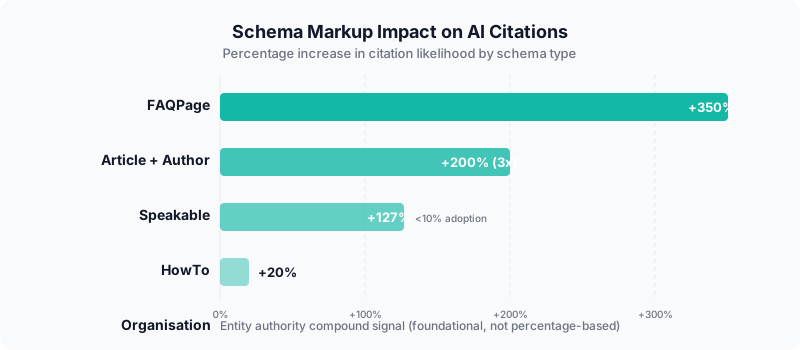
Schema markup does not buy citations and there is no published, reproducible figure that says "type X gives Y percent more citations". What schema does is reduce ambiguity. The Generative Engine Optimization paper (arXiv 2311.09735) found that content which is clearly attributed, cites sources, and states facts plainly is more likely to be surfaced by generative engines. Schema is the structured layer of that same principle: it tells the engine, unambiguously, what your organisation is, who wrote a page, when it was updated, and how your pages relate to each other. Treat schema as entity hygiene, not a growth hack.
Schema types ranked by how much they help AI understanding
| Schema type | What it does for AI | Priority |
|---|---|---|
| Connected @graph (Organization + WebSite + WebPage) | Links your entity, site, and page by @id so the engine sees one verified network rather than disconnected blocks | Critical |
| Organization + sameAs | Establishes the entity and connects it to authoritative profiles (LinkedIn, Wikidata) for cross-referencing | Critical |
| Article + Person author | Attributes content to a named author and a publisher, with datePublished/dateModified for freshness | High |
| Speakable | Flags the most quotable passages; low adoption, low cost, narrow but real support | Optional edge |
| BreadcrumbList | Describes where a page sits in your site, helping topical structure | Medium |
| Product + Offer | Gives commerce details (price, availability, brand) in machine-readable form for product queries | High (ecommerce) |
| FAQPage | Deprecated. Google removed FAQ rich results in 2023; do not add it | Avoid |
1. The @graph pattern - connect your entities
The @graph pattern connects multiple schema entities into a single, interlinked structure. Instead of separate disconnected blocks, @graph tells AI platforms your Organisation, WebSite, WebPage, and Article are part of the same verified network, linked by @id. This connected signal is more useful than the same blocks scattered and unlinked, because the engine can resolve every reference to a single entity rather than guessing.
<script type="application/ld+json">
{
  "@context": "https://schema.org",
  "@graph": [
    {
      "@type": "Organization",
      "@id": "https://example.com/#organization",
      "name": "Your Company",
      "url": "https://example.com",
      "sameAs": [
        "https://www.linkedin.com/company/yourco",
        "https://www.wikidata.org/wiki/Q123456"
      ]
    },
    {
      "@type": "WebSite",
      "@id": "https://example.com/#website",
      "url": "https://example.com",
      "name": "Your Company",
      "publisher": { "@id": "https://example.com/#organization" }
    },
    {
      "@type": "WebPage",
      "@id": "https://example.com/guide/#webpage",
      "url": "https://example.com/guide/",
      "isPartOf": { "@id": "https://example.com/#website" }
    },
    {
      "@type": "Person",
      "@id": "https://example.com/#author",
      "name": "Author Name",
      "jobTitle": "Expert Title",
      "worksFor": { "@id": "https://example.com/#organization" }
    },
    {
      "@type": "Article",
      "headline": "Article Title",
      "isPartOf": { "@id": "https://example.com/guide/#webpage" },
      "author": { "@id": "https://example.com/#author" },
      "publisher": { "@id": "https://example.com/#organization" },
      "speakable": {
        "@type": "SpeakableSpecification",
        "cssSelector": [".answer-capsule"]
      }
    }
  ]
}
</script>
Reference: schema.org/WebSite, schema.org/WebPage.
How @graph strengthens AI understanding
- Connects author to organisation, establishing where the content comes from
- Links article to a verified publisher and the page it lives on
- Uses @id references, so the engine resolves each entity once instead of seeing duplicates
- Gemini draws on Google's Knowledge Graph, so a clean, internally consistent entity graph helps it reconcile your structured data with what it already knows
2. Organisation schema and sameAs - entity authority
Organisation schema with @id and sameAs links is the foundation of your entity. AI platforms use it to confirm your brand exists and to connect it to other places it appears. sameAs links to LinkedIn, Wikidata, and your verified profiles let an engine cross-reference your claims against independent sources, which is far stronger than an unlinked, self-asserted name.
Reference: schema.org/Organization, schema.org/sameAs.
<script type="application/ld+json">
{
  "@context": "https://schema.org",
  "@type": "Organization",
  "@id": "https://example.com/#organization",
  "name": "Your Company Name",
  "url": "https://example.com",
  "logo": "https://example.com/logo.png",
  "description": "Your consistent brand description used everywhere.",
  "foundingDate": "2020",
  "areaServed": {
    "@type": "Country",
    "name": "United Kingdom"
  },
  "sameAs": [
    "https://www.linkedin.com/company/your-company",
    "https://www.wikidata.org/wiki/Q123456",
    "https://www.youtube.com/@yourcompany",
    "https://g.co/kgs/yourGBPid"
  ],
  "contactPoint": {
    "@type": "ContactPoint",
    "contactType": "customer service",
    "email": "[email protected]"
  }
}
</script>
Organisation schema best practices
- Use @id to create a persistent identifier other schema can reference
- Include sameAs links to authoritative profiles. A Wikidata item is especially valuable because it is itself a node in the open entity graph that engines draw on
- Use areaServed, which matters for local and regional businesses
- Match the description to what appears on your GBP, LinkedIn, and other profiles, so cross-references reinforce rather than contradict each other
- Include foundingDate to add an entity permanence signal
3. Article and a named author
Article schema attributes a page to a named author and a publisher, with datePublished and dateModified. A clearly attributed, dated, well-sourced page is the kind of content the GEO research found generative engines prefer to surface. Connecting the Article to a real Person and Organisation, rather than leaving authorship implicit, makes that attribution explicit and verifiable.
Reference: schema.org/Article, schema.org/Person, Google Article documentation.
<script type="application/ld+json">
{
  "@context": "https://schema.org",
  "@type": "Article",
  "headline": "Your Article Title",
  "description": "A clear description of the article content.",
  "datePublished": "2026-04-01",
  "dateModified": "2026-04-06",
  "author": {
    "@type": "Person",
    "@id": "https://example.com/#author-jane",
    "name": "Jane Smith",
    "jobTitle": "AI Search Analyst",
    "url": "https://example.com/about/jane-smith/",
    "sameAs": [
      "https://www.linkedin.com/in/janesmith"
    ]
  },
  "publisher": {
    "@id": "https://example.com/#organization"
  },
  "mainEntityOfPage": "https://example.com/article-url/"
}
</script>
Author and Person best practices
- Create an author bio page on your site and link to it via url
- Connect the Person to LinkedIn and other professional profiles via sameAs
- Include jobTitle to establish expertise relevance
- Use @id so other pages can reference the same author entity
- Include dateModified and keep it honest. Google's Article guidance asks that the date reflect a genuine update, not a cosmetic change
4. Speakable schema - a narrow, low-cost edge
Speakable schema marks content suitable for text-to-speech and voice assistants using CSS selectors or XPaths to flag the passages a platform should read aloud. Google documents Speakable as a limited feature aimed at news content, so support is partial rather than universal. It is low cost to add and few sites bother with it, which makes it a small, optional edge rather than a core requirement.
Reference: schema.org/speakable, Google Speakable documentation.
<script type="application/ld+json">
{
  "@context": "https://schema.org",
  "@type": "Article",
  "headline": "Your Article Title",
  "speakable": {
    "@type": "SpeakableSpecification",
    "cssSelector": [".answer-capsule", "h1"]
  },
  "publisher": {
    "@id": "https://example.com/#organization"
  }
}
</script>
Speakable implementation tips
- Use cssSelector to target your answer capsule paragraphs
- Include the page title (h1) as speakable
- Keep speakable content concise, around two or three sentences per section
- Validate with Google's Rich Results Test
5. BreadcrumbList - site structure signal
Reference: schema.org/BreadcrumbList, Google breadcrumb documentation.
<script type="application/ld+json">
{
  "@context": "https://schema.org",
  "@type": "BreadcrumbList",
  "itemListElement": [
    { "@type": "ListItem", "position": 1, "name": "Home", "item": "https://example.com/" },
    { "@type": "ListItem", "position": 2, "name": "Guides", "item": "https://example.com/guides/" },
    { "@type": "ListItem", "position": 3, "name": "Schema Markup", "item": "https://example.com/schema-markup-ai-search/" }
  ]
}
</script>
BreadcrumbList helps crawlers understand your site hierarchy and the topical relationships between pages. It tells a platform where a page sits within your structure, which supports topical authority assessment.
BreadcrumbList best practices
- Include BreadcrumbList on every page, not just deep pages
- Use descriptive names that include relevant keywords, not just "Page 1"
- Match the breadcrumb trail to your actual URL structure
- Keep trails logical: Home > Category > Subcategory > Page
6. Product and Offer - commerce details for AI
Product schema with an Offer gives AI platforms the concrete commerce details (price, currency, availability, brand) that product and shopping queries depend on. It is the structured form of the facts a buyer needs, and it lets an engine state them accurately rather than scraping them from prose. Only include AggregateRating when you have genuine, verifiable review data behind it.
Reference: schema.org/Product, schema.org/Offer, Google Product documentation.
<script type="application/ld+json">
{
  "@context": "https://schema.org",
  "@type": "Product",
  "name": "Product Name",
  "description": "Clear product description with key features.",
  "brand": {
    "@type": "Brand",
    "name": "Your Brand"
  },
  "offers": {
    "@type": "Offer",
    "price": "99.00",
    "priceCurrency": "GBP",
    "availability": "https://schema.org/InStock"
  }
}
</script>
Product schema with accurate Offer data feeds product and comparison answers. If you publish AggregateRating, it must reflect real reviews that are visible on the page; fabricated or unverifiable ratings breach Google's structured data policies and undermine trust.
7. FAQPage - deprecated, do not use
FAQPage schema is no longer a useful target. Google deprecated FAQ rich results in August 2023 and now shows them only for a small set of authoritative government and health sites. For everyone else FAQPage no longer produces a rich result, and we do not recommend adding it. You can still write helpful questions and answers as normal page content; you simply do not mark them up as FAQPage.
If you previously added FAQPage markup expecting rich results, you can safely remove it. The useful version of "answer the question" is plain, well-structured prose with a clear question as a heading and a concise answer beneath it, which any engine can read without the deprecated markup.
Common schema mistakes that hurt AI understanding
The most common schema mistakes are having no Organisation schema at all, using schema without @id references so blocks float disconnected, having sameAs links that point to dead profiles, and implementing schema that contradicts the visible page content. AI platforms can detect inconsistencies between structured data and on-page content, and an inconsistency is worse than no markup.
Mistake 1: No Organisation schema at all
Without Organisation schema, AI platforms have to infer your business name, type, and location from unstructured text. Adding Organisation schema is a short task that immediately gives engines a clear, machine-readable entity to anchor to. This is the most common gap we find in audits.
Mistake 2: Schema without @id references
If your Organisation schema has no @id, other blocks cannot reference it, so your Article and Person schema float as disconnected entities. Use @id on every block and reference it with { "@id": "..." } instead of duplicating data.
Mistake 3: Dead sameAs links
If your sameAs array includes links to deleted profiles or old domains, engines find broken references and have less reason to trust the entity. Audit your sameAs links periodically and remove any that no longer resolve.
Mistake 4: Schema that contradicts page content
If your Organisation schema says "London" but your page says "Manchester", a platform detects the conflict and trusts neither. Schema must match visible content. Your business description in schema should match the description on your homepage, GBP, and LinkedIn.
Mistake 5: Missing dateModified on articles
Platforms use dateModified to judge freshness. If your Article schema has no dateModified, there is nothing to read. Include both datePublished and dateModified, and update dateModified only when you genuinely revise the content, in line with Google's Article guidance.
Mistake 6: Adding deprecated FAQPage markup
FAQPage no longer produces rich results for most sites since Google's August 2023 change. Adding it now spends effort for no return and can clutter your output. Write the questions and answers as normal content instead.
Testing and validating your schema
Use Google's Rich Results Test and the Schema.org validator to check your schema. Test every page type, not just your homepage. Confirm @id references resolve, sameAs links work, and the schema matches visible content. Re-test after meaningful site updates.
Testing tools
- Google Rich Results Test validates JSON-LD and shows which rich results your schema supports
- Schema.org Validator checks syntax and structure against the Schema.org specification
- Google Search Console reports schema errors and warnings across your site
What to check
- Every @id reference resolves to a real schema block
- Every sameAs URL returns a live page
- Organisation name matches your GBP, LinkedIn, and other profiles
- dateModified is accurate and recent
- Author Person schema links to a real bio page on your site
- No duplicate schema blocks on the same page
- No leftover FAQPage markup
Implementation checklist
| Step | Schema type | Page type |
|---|---|---|
| 1. Add Organisation schema | Organization | Every page (via site-wide template) |
| 2. Add WebSite and WebPage | WebSite, WebPage | Site-wide and per page |
| 3. Add Person schema for authors | Person | Author bio pages and articles |
| 4. Add Article schema | Article | Blog posts, guides, insights |
| 5. Connect everything with @graph | @graph | All pages |
| 6. Add BreadcrumbList | BreadcrumbList | Every page |
| 7. Add Speakable (optional) | SpeakableSpecification | Content pages |
| 8. Add Product and Offer | Product, Offer | Product pages |
| 9. Do not add FAQPage | (deprecated) | n/a |
| 10. Validate | - | Google Rich Results Test |
How each AI platform uses schema
Platforms weight signals differently. The notes below are directional, based on each platform's documented data sources, not measured citation rates.
| Platform | Signals it leans on | Why |
|---|---|---|
| ChatGPT | Organisation, entity consistency | Web results come largely via Bing, so a clear, consistent entity helps it build a reliable profile |
| Gemini | Organisation, Person, sameAs | Draws on Google's Knowledge Graph, so it benefits from structured data it can reconcile with what it already holds |
| Perplexity | Article, dateModified | Emphasises live sources and freshness, so accurate dates and clear attribution matter |
| AI Overviews | Article, BreadcrumbList, Speakable | Sits inside Google Search and reads supported structured data directly |
| Claude | Organisation, Article | Clear entity and authorship help it understand and attribute a source when it retrieves the page |
Frequently asked questions
Does schema directly improve AI citations?
Not on its own, and there is no reliable published figure that puts a percentage on it. What schema does is remove ambiguity: it states your entity, authorship, dates, and page relationships in a form an engine can read without guessing. That supports the broader pattern the GEO research describes, where clearly attributed, well-sourced content is more likely to be surfaced.
Which schema type should I add first?
Organisation schema, connected to your WebSite and pages via a @graph. It is the foundation that every other type references. Add it site-wide through your template, then layer Article and Person schema onto your content pages.
Should I still add FAQPage schema?
No. Google deprecated FAQ rich results in August 2023, and they now appear only for a narrow set of authoritative government and health sites. For everyone else FAQPage produces no rich result, so adding it is wasted effort. Write your questions and answers as ordinary page content instead.
Can I use a WordPress plugin for schema?
Yes, but check the output. Plugins such as Yoast, RankMath, and Schema Pro generate valid schema but often omit fields that matter for entity understanding, such as sameAs, areaServed, and @id references. Supplement plugin output with the fields that connect your entities.
Does schema work the same for ecommerce and service businesses?
The core entity types (Organisation, WebSite, Article, Person) apply to both. Ecommerce sites should add Product and Offer schema. Service businesses should add LocalBusiness or ProfessionalService and Person schema. Read our guide on AI search for ecommerce for sector-specific advice.
What to do next
- Get a free audit to check your schema implementation
- How to structure your website for AI crawlers
- How Gemini uses schema to verify claims
- Compare how each platform uses schema differently
- AEO vs GEO vs LLMO - which approach is right?
- AI search glossary - every term defined
- AI search visibility - the complete guide
- How to show on AI search - step by step
Oliver Mackman
AI Search Analyst, SEOCompare
Oliver leads SEOCompare's editorial and comparison research. With over a decade in digital marketing, he oversees agency evaluation, tool testing, and AI search data analysis.
Last reviewed: 24 May 2026
Need help with AI search visibility?
Get a free AI visibility audit to see how your business appears across ChatGPT, Gemini, Perplexity, and AI Overviews.
Request your free audit